Vintage Toys Photoshop Stamp Brushes
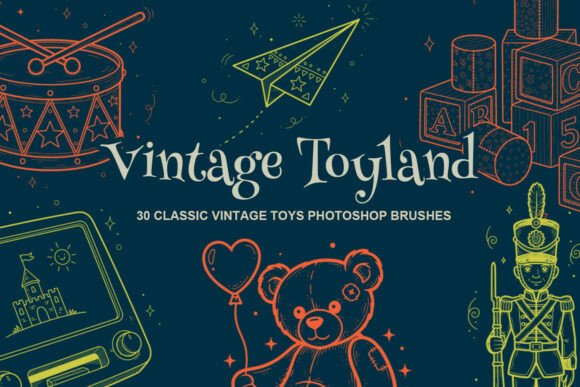
If you’ve ever spent hours sketching a retro toy train or teddy bear—only to tweak line weight, scale, and spacing three times before it fits your layout—you’ll appreciate how much time Vintage Toys Photoshop Stamp Brushes saves. This isn’t just another clipart pack. It’s a curated set of 30 high-resolution, AI-generated stamp brushes built specifically for designers who need authentic, nostalgic toy imagery—fast, consistently, and with zero pixelation.
What Makes These Brushes Stand Out?
Each brush in the Vintage Toyland collection is rendered at full resolution with clean vector-like outlines and balanced negative space—designed so they hold up whether scaled down for a business card or enlarged across a 24×36" poster. Unlike generic retro assets that lean cartoonish or overly stylized, these brushes capture the subtle charm of mid-century playthings: the gentle curve of a wooden rocking horse’s neck, the segmented body of a pull-along dog, the precise geometry of a tin spinning top.
The brushes are delivered as a single .abr file, meaning one-click installation in Photoshop (CC 2018 and later). No unzipping folders, no hunting for PNGs, no layer masking to isolate shapes. Just select the brush, click once—and place a perfectly proportioned vintage toy where you need it. They’re pressure-sensitive, too, so light taps yield delicate outlines; firmer presses add subtle texture or weight if your project calls for it.
Real Projects, Real Time Saved
Freelance illustrators building children’s book spreads often juggle tight deadlines and client revisions. With Vintage Toys Photoshop Stamp Brushes, you can block out character environments quickly—drop in a wind-up robot beside a storybook tree, then adjust hue and blending mode to match your palette. No redrawing. No stock licensing concerns. Just expressive, cohesive visuals that feel handmade—not templated.
Educators designing classroom posters or literacy handouts benefit from the clarity and familiarity of these toys. A preschool teacher creating a “Letter T” worksheet can stamp a toy train, top, and teddy bear—all distinct enough for visual discrimination, yet unified by shared line quality and era-appropriate detail. That consistency helps young learners focus on concepts, not stylistic noise.
Branding teams launching a retro-themed bakery, toy shop, or boutique baby line use these brushes to build custom patterns, packaging motifs, and social media banners. Because each stamp has uniform stroke weight and spacing, repeating them into seamless tiles or border elements feels intentional—not patchwork. One designer recently used the rocking horse and pull-along dog brushes to create a woven-texture gift tag series—exported at 300 DPI, printed flawlessly on kraft paper.
Where Else These Brushes Fit Naturally
- Scrapbook & printable designers: Layer stamps over scanned paper textures or faded photos. The crisp edges prevent muddiness—even when overlaid on busy backgrounds.
- Bloggers & content creators: Illustrate nostalgia-driven posts (“10 Toys We Wish Were Still in Stores”) without commissioning custom art. Pair a stamped spinning top with handwritten typography for instant visual storytelling.
- Small-business owners: Build branded thank-you cards, loyalty program graphics, or product labels using consistent toy motifs—no need to hire an illustrator for every variation.
- Digital planners & journal makers: Use individual stamps as functional icons—e.g., a tiny train for “travel goals,” a teddy bear for “self-care.” Their simplicity reads clearly at small sizes.
Practical Considerations Before You Install
These brushes work best in Photoshop—not Illustrator, Procreate, or Affinity Photo (though you can export individual stamps as PNGs for cross-platform use). If you're new to brush libraries, remember: install via Edit > Presets > Preset Manager > Load, then access them from the Brush Tool dropdown. For maximum control, pair them with Shape Layers (right-click brush stroke > “Convert to Shape”)—this lets you recolor non-destructively and scale infinitely.
While all 30 brushes are AI-generated, they were manually refined to avoid uncanny-valley quirks—no distorted wheels, mismatched proportions, or floating limbs. That attention shows up most in complex items like toy trains, where coupling details and carriage windows remain legible even at 15% scale.
One note about tone: these aren’t “cute” in a modern pastel-kawaii way. They’re warm, grounded, and quietly detailed—think 1940s catalog illustrations, not TikTok stickers. That makes them especially useful when authenticity matters more than trendiness: heritage brand refreshes, museum exhibit graphics, or archival-style publishing projects.
Why This Set Fits Into Your Workflow—Not Around It
Most vintage clipart collections force trade-offs: high-res files that lack flexibility, or editable vectors that demand illustration skill. Vintage Toys Photoshop Stamp Brushes bridges that gap. They give you the speed of drag-and-drop assets with the adaptability of native Photoshop tools—blending modes, layer masks, clipping paths, and smart object scaling all work seamlessly.
You’re not locked into one aesthetic either. Desaturate a stamped teddy bear for a muted linen label. Add grain and a slight Gaussian blur for a vintage postcard effect. Multiply the train brush over a sepia-toned map background to imply motion and journey. The brushes respond predictably—because their structure was built for manipulation, not just decoration.
For marketers building email campaigns around “childhood summers” or “generational gifting,” these brushes help convey emotional resonance without relying on clichéd fonts or overused stock photos. A single stamped top beside a headline like “Spin Back to Simpler Times” does more heavy lifting than three paragraphs of copy.
Ultimately, Vintage Toys Photoshop Stamp Brushes earns its place in your toolkit not because it’s novel—but because it solves quiet, daily problems: inconsistency in illustration style, slow asset iteration, licensing ambiguity, and the fatigue of chasing “vintage” that looks convincingly old instead of just filtered. It’s the kind of resource you forget you’re using—until you try working without it.