Vintage Christmas Skeleton Clipart PNG
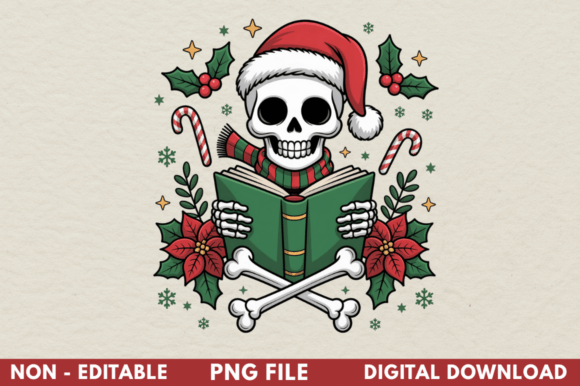
There’s a growing charm in blending the nostalgic with the macabre—especially during the holidays. Vintage Christmas Skeleton Clipart PNG taps into that sweet spot: whimsical, timeless, and just eerie enough to stand out. Think hand-drawn bones wrapped in tinsel, skeletal Santas sipping cocoa, or grinning skulls perched atop candy canes—all rendered in crisp, high-fidelity digital form. It’s not just spooky decor; it’s expressive visual storytelling for creators who want personality without cliché.
Why This Isn’t Just Another Holiday Clipart Download
What sets a quality Vintage Christmas Skeleton Clipart PNG apart isn’t just the theme—it’s how thoughtfully it’s built for real-world use. Many free or low-cost options promise “vintage” but deliver pixelated edges, inconsistent line weights, or muddy color palettes that flatten under sublimation heat. Others claim transparency but leave faint halos or compression artifacts around the edges—problems that only become obvious after you’ve pressed a mug or cut vinyl for a tote bag.
A true 300 DPI PNG with a clean transparent background does more than look sharp on screen. It holds up through resizing, survives color correction in design software, and transfers cleanly onto fabric, ceramic, and metal surfaces. That reliability saves time, materials, and client trust—especially if you’re selling custom merchandise or building a seasonal brand identity.
Common Oversights—and What They Cost You
Mistake #1: Assuming “PNG” automatically means print-ready. Not all PNGs are equal. Some are exported at 72 DPI (fine for web banners, disastrous for sublimation). Others include embedded color profiles that shift hues unpredictably when printed. If your skeleton’s deep burgundy turns brick-red on a tumbler wrap, it’s rarely the printer’s fault—it’s often an uncalibrated source file.
Mistake #2: Skipping the layer check before importing. Even well-made clipart can contain hidden layers—like subtle drop shadows or background textures—that don’t render properly in Silhouette Studio or Canva. These layers may appear invisible until you resize or export, then suddenly block part of your design or add unwanted white space.
Mistake #3: Using vintage-style fonts or textures that clash tonally. A delicate script font next to bold, chunky skeleton outlines can feel disjointed—not charmingly eclectic. Similarly, pairing high-contrast black-and-white clipart with overly saturated gradients creates visual competition instead of harmony.
How to Choose—and Use—Vintage Christmas Skeleton Clipart PNG Wisely
Before downloading or purchasing, ask yourself three practical questions:
- Does the preview show actual usage examples? Look for mockups on mugs, shirts, or holiday signs—not just isolated icons on a white background. Real context reveals how the art scales and interacts with real products.
- Is the file labeled with technical specs beyond “PNG”? Reputable sources list resolution (300 DPI), color mode (RGB or CMYK), and whether it includes alpha-channel transparency. If those details are missing or vague, assume extra prep work lies ahead.
- Can you test the file in your workflow before committing? Try opening it in your usual software—even if just to zoom in at 400%. Check for jagged lines, color banding, or stray pixels along the skeleton’s edges. If it looks soft or inconsistent at high zoom, it won’t hold up in production.
Once you have the right file, avoid over-editing. Sublimation works best when colors remain vibrant and contrast stays strong. Instead of adding filters or heavy recoloring in Canva, use the original palette as a foundation—then adjust brightness or saturation in small increments. For example, warming up a cool gray bone tone slightly helps it pop against a cream-colored tote bag without losing vintage authenticity.
Better Workflow Habits for Consistent Results
You don’t need advanced design skills—but consistency matters. Here’s what experienced creators do differently:
- Always rename your files clearly—e.g., “vintage-skeleton-santa-300dpi-transparent.png”—so you never accidentally grab last year’s lower-res version.
- Test print one element first—a single bone motif on scrap fabric or a corner of a test mug—before running a full batch. Heat, pressure, and substrate all affect final output.
- Keep a style guide snippet for your seasonal designs: note which fonts pair well (think serif sans-serifs like Playfair Display or geometric types like Montserrat), preferred accent colors, and safe minimum sizing (e.g., “no smaller than 2.5 inches wide for mug wraps”).
And remember: versatility doesn’t mean forcing one design everywhere. That same Vintage Christmas Skeleton Clipart PNG might anchor a bold t-shirt front, serve as a subtle watermark on digital greeting cards, or become part of a layered SVG cut file for wooden ornaments. Its strength lies in adaptability—not uniformity.
Final Thought: Quality Is Quiet Confidence
You’ll rarely hear someone say, “This mug looks great because the clipart was 300 DPI with perfect transparency.” But you’ll hear, “Where did you get this? It feels so *intentional*.” That intention comes from choosing tools that behave predictably—not chasing trends or cutting corners on file integrity. Whether you're designing for Etsy, classroom holiday projects, or a small-batch apparel line, investing time in vetting your Vintage Christmas Skeleton Clipart PNG pays off in fewer reprints, clearer communication with clients or collaborators, and designs that age well—just like the vintage aesthetic itself.