Unicorn Capital Monogram Letter E
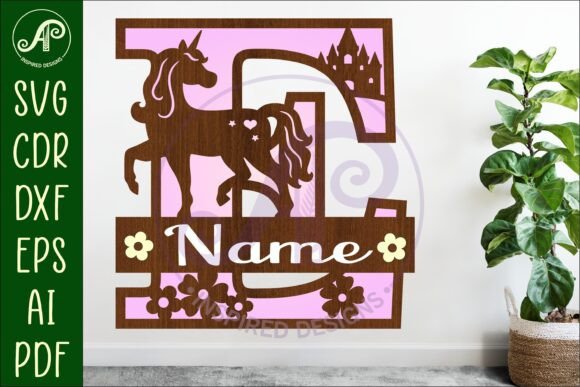
If you're cutting custom signs, personalizing gifts, or building branded decor for your small business — the Unicorn Capital Monogram Letter E is more than just a letter. It’s a ready-to-use, layered design built for precision, flexibility, and real-world results. Whether you’re laser-cutting wooden coasters in your garage workshop or prepping a batch of acrylic desk nameplates for your team, this digital download delivers what matters most: clean cut lines, smart layering, and formats that actually work with your machine.
What You Get — And Why It Fits Real Projects
This isn’t a generic alphabet file tossed into a bundle. The Unicorn Capital Monogram Letter E is thoughtfully structured for physical fabrication: three distinct layers — backing, detailed front cut-out, and top-layer accents (like tiny floral motifs or geometric cut-outs) — all aligned to build depth and visual interest. That means when you cut birch plywood or 3mm acrylic, the layers nest cleanly, snap together without fuss, and hold up to handling, mounting, or gifting.
It’s sized to cut at around 25cm tall — a versatile scale that works on wall signs, nursery decor, retail shelf talkers, or even as part of a larger monogram set. But here’s the practical win: because it’s vector-based and saved in SVG, DXF, AI, CDR, and PDF, you can resize it without losing edge clarity. No pixelation. No jagged corners. Just crisp, machine-ready geometry — whether you’re scaling down to 8cm for earrings or up to 40cm for a boutique window display.
Where People Actually Use It
Hobbyists & makers reach for the Unicorn Capital Monogram Letter E when they want something polished but not time-consuming. Think: a weekend project turning scrap walnut into a personalized bookend, or cutting matching letters for each family member’s bedroom door. The blue exterior cut lines? They’re not decorative — they’re a workflow shortcut. Your laser software recognizes them instantly, so you skip manual line sorting and get straight to cutting.
Small business owners use it to add subtle, upscale branding without hiring a designer. A café owner might mount a walnut “E” beside the espresso machine — referencing the shop’s founder’s name or a signature blend (“Espresso Reserve”). A boutique stylist uses it as part of a rotating seasonal display: “E” for “Elegance”, “Eco”, or “Edit” — paired with dried florals and linen backdrops. Because the file includes both solid and outline versions (SVG), they can choose engraving-only for texture or full cut-outs for dimension — all from one download.
Educators and makerspaces rely on its consistency. When teaching CNC routing basics to teens or adult learners, having a predictable, well-structured file reduces setup friction. There’s no guessing whether the inner cut-outs will clear properly or if the layers align across material thicknesses. That reliability means more time spent on technique — like adjusting kerf compensation or testing feed rates — and less time troubleshooting misaligned vectors.
Freelancers and content creators integrate it into client deliverables. A branding designer might include a custom monogram element like the Unicorn Capital Monogram Letter E as part of a style guide package — giving clients editable, production-ready assets for signage, packaging, or merch. A lifestyle blogger uses it to create Instagrammable flat-lay props: a marble tray with gold-accented “E” next to candles and notebooks — then shares the file source in their resource list (with proper credit, of course).
What to Consider Before You Download
First: this is a digital download only. No wood, no acrylic, no shipping box — just the files, delivered instantly after purchase. If you’re new to laser cutting, double-check your software supports SVG or DXF imports (most do — LightBurn, RDWorks, CorelDRAW, Adobe Illustrator, and Inkscape all handle them natively). If you’re using a Glowforge, the SVG version works out-of-the-box; for diode lasers or GRBL-based machines, DXF often gives more predictable layer behavior.
Second: material matters. The design assumes standard kerf for 3–6mm materials. If you’re cutting thick MDF or thin veneer, you may need to adjust power/speed settings — but the vector integrity stays intact. Also, while the PDF version is great for printing templates or sharing with collaborators, it’s not for direct machine use — keep SVG or DXF for cutting.
Third: licensing. This file is for personal and commercial use — meaning you can sell items you make with it (like engraved keychains or wedding signs). But you can’t resell or redistribute the digital file itself. That protects both the designer and buyers who expect original, supported assets.
How It Fits Into Bigger Workflows
You don’t always need a full monogram set to make an impact. Sometimes, one strong letter does the work: a studio door sign reading “E” instead of “Edit Studio”; a teacher’s desk plaque marking “Room E”; or a minimalist logo lockup where the “E” stands alone beside a tagline. The Unicorn Capital Monogram Letter E bridges those moments — where simplicity meets intention.
It also plays well with others. Pair it with plain sans-serif fonts for contrast, or layer it behind hand-lettered quotes in your design software. Because the backing layer is separate, you can swap materials — matte black acrylic for the base, frosted white for the front, and brass foil for the top accents — without redrawing anything. That modularity saves hours over building from scratch.
And for anyone managing multiple projects across platforms — say, prepping files for a local maker fair *and* designing digital mockups for a client pitch — having one consistent, high-fidelity letter asset means less version confusion, fewer export errors, and smoother handoffs.
Final Thought: It’s About Confidence, Not Just Cutting
The value of the Unicorn Capital Monogram Letter E isn’t just in its curves or corner radii — it’s in the quiet confidence it brings to your process. Knowing the layers align. Knowing the blue cut lines won’t confuse your software. Knowing you can scale it for a gift tag or a storefront sign — and still get clean results. That’s what turns a good idea into something you actually finish, display, ship, or sell.
So whether you’re prototyping your first product, refreshing your studio walls, or helping a client stand out on a crowded shelf — this isn’t just another letter file. It’s a small, reliable piece of your making workflow — designed to work, not just look pretty.