2026 Online Business Workbook Canva: A Practical Planning Hub for Digital Entrepreneurs
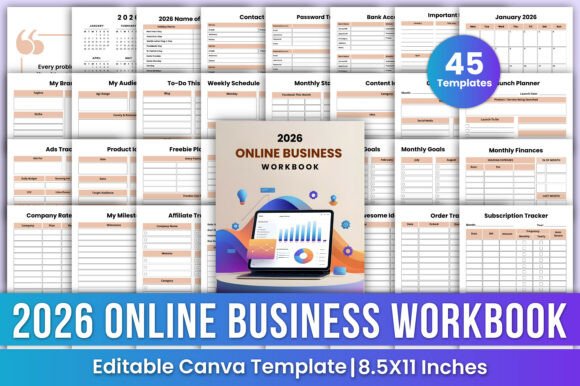
The 2026 Online Business Workbook Canva isn’t just another digital planner—it’s a structured, editable system built for how online businesses actually operate. It bridges the gap between broad strategy and daily execution, giving entrepreneurs, creators, and solopreneurs a single source of truth that adapts as their business evolves. Unlike static PDF planners or fragmented apps, this workbook lives in Canva, meaning it’s fully customizable without needing design skills—and exports cleanly to high-resolution print-ready PDFs when needed.
Where It Fits in Your Business Workflow
Think of the 2026 Online Business Workbook Canva as your operational backbone—not a standalone tool, but an anchor point that connects planning, tracking, and reflection. You’ll use it before launching a new offer (to map timelines, audience messaging, and ad spend), during content creation (to align ideas with seasonal trends and platform-specific calendars), and after campaigns (to log metrics, affiliate payouts, and lessons learned). It’s designed to support continuity across quarters, not just isolated tasks.
For example, a freelance educator launching a course in March 2026 would start with the Launch Planner and Content Planner in January, then shift focus to the Ads Tracker and Monthly Statistics pages in February to monitor early engagement. By April, they’re reviewing the Order Tracker and Affiliate Tracker alongside the Monthly Finances page—closing the loop on revenue, refunds, and payout timing.
How It Integrates With Other Tools You Already Use
The 2026 Online Business Workbook Canva doesn’t replace your CRM, email platform, or accounting software. Instead, it complements them by centralizing inputs and outputs you’d otherwise scatter across notes apps, spreadsheets, or sticky notes. You enter contact details once in the Contact List, then reference them when drafting outreach sequences in MailerLite or setting up segments in ConvertKit. You log ad spend from Meta Ads Manager into the Ads Tracker, then compare it against conversion data pulled from Google Analytics or your LMS dashboard.
It also works well alongside time-blocking tools like Google Calendar or Notion. The Weekly Schedule page helps you assign blocks to specific outcomes—not just “work on website,” but “revise homepage copy based on Q4 survey feedback” or “record welcome series audio for new freebie launch.” That specificity makes calendar entries actionable and measurable.
Customization That Serves Your Process—Not Just Your Aesthetics
Because every template is editable directly in Canva, personalization goes beyond color palettes and fonts. You can rearrange sections to match your workflow rhythm—for instance, moving the Freebie Planner ahead of the Welcome Series Planner if lead magnet development always precedes email setup. You can add columns to the Company Rates Tracker for retainer vs. project-based pricing, or expand the Product Ideas page with filters for feasibility, audience demand, and tech requirements.
This level of flexibility matters most during scaling phases. A blogger adding a coaching offer might repurpose the My Brand and My Audience pages to define positioning shifts, while using the Milestones tracker to align internal deadlines with external announcements. No need to switch tools—just adapt what’s already there.
Practical Implementation Tips for Real-World Use
- Start with one section per week. Don’t try to populate everything at once. Pick the highest-leverage area—like Monthly Goals or To-Do This Week—and build consistency before layering in financials or analytics.
- Use the “Belongs To” and “Important Notes” pages as your living index. Jot down where key assets live (e.g., “Brand voice doc → Google Drive / Branding folder”), or note recurring patterns (“Q3 traffic spikes on Pinterest Tuesdays—schedule pins Mon 8am EST”).
- Sync your calendar with the 2026 Monthly Planner. Block out holidays from the 2026 Name of Holiday list, then add personal deadlines and client review dates. This avoids overcommitting during low-energy periods like mid-December or late August.
- Print only what you need—when you need it. The high-quality PDF files are ideal for quarterly reviews or in-person team syncs. Keep digital versions open for real-time updates during calls or brainstorming sessions.
Long-Term Usability: Designed for Consistency, Not Clutter
Many planners lose value after a few months because they’re too rigid or too vague. The 2026 Online Business Workbook Canva avoids both pitfalls. Its structure encourages regular revisiting—not through forced daily journaling, but through functional repetition. You’ll naturally return to the Monthly Overview each month to assess goals, the Content Ideas page when brainstorming, and the Subscription Tracker when evaluating tools you pay for quarterly.
That repetition builds habit and clarity. Over time, patterns emerge: which content themes drive repeat engagement, which platforms deliver best ROI per hour spent, which months consistently require more admin work. Those insights don’t come from raw data alone—they come from consistent, contextual logging across aligned templates.
Compatibility and Setup Considerations
You don’t need Canva Pro to use the 2026 Online Business Workbook Canva. All core editing features—text changes, font swaps, color adjustments, layout reordering—are available on the free plan. If you want to download branded PDFs with custom fonts embedded, upgrading to Canva Pro ensures full fidelity, but even free users get clean, professional-looking exports.
Organizationally, it’s smart to store your edited version in a dedicated Canva folder labeled “Business Systems” and maintain a version history naming convention (e.g., “2026_Workbook_v2_MarchGoals”). This supports quality control—especially if you’re collaborating with a VA or co-founder who needs access to updated trackers or brand guidelines.
Who Benefits Most—and Why
The 2026 Online Business Workbook Canva serves people who value intentionality over improvisation: freelancers juggling multiple clients and income streams, educators building course ecosystems, bloggers expanding into digital products, and small service-based businesses refining their offers year after year. It’s especially useful for those who’ve outgrown basic to-do lists but aren’t ready—or don’t want—to invest in complex project management software.
Hobbyists turning side projects into micro-businesses find it valuable because it scaffolds growth without demanding expertise. A craft seller adding wholesale accounts can use the Bank Account and Company Rates Tracker pages to compare margin impact across channels. A podcast host testing sponsorships can track outreach status, rates, and contract terms in one place instead of across emails and text threads.
Final Thought: Planning That Keeps Pace With You
A planner only works if it stays relevant. The 2026 Online Business Workbook Canva does that by being both comprehensive and modular—detailed enough to support strategic decisions, yet flexible enough to evolve with your priorities. It doesn’t assume you’ll follow a rigid methodology. Instead, it gives you the framework to define your own rhythm: whether you plan quarterly, monthly, or in sprints around product launches.
What makes it durable isn’t its completeness—it’s its clarity. Every page has a defined purpose, every field invites intentional input, and every section links to real actions. That’s how planning becomes execution, and execution becomes growth.